

 当前位置:
当前位置:中空玻璃生产线实操科普:扫描仪这样调整,尺寸识别更精准
时间:2026-03-04 来源:http://www.jncsjx.com/ 发布人:昌盛机械
中空玻璃生产线实操科普:扫描仪这样调整,尺寸识别更精准
Practical popularization of hollow glass production line: Adjusting the scanner in this way makes size recognition more accurate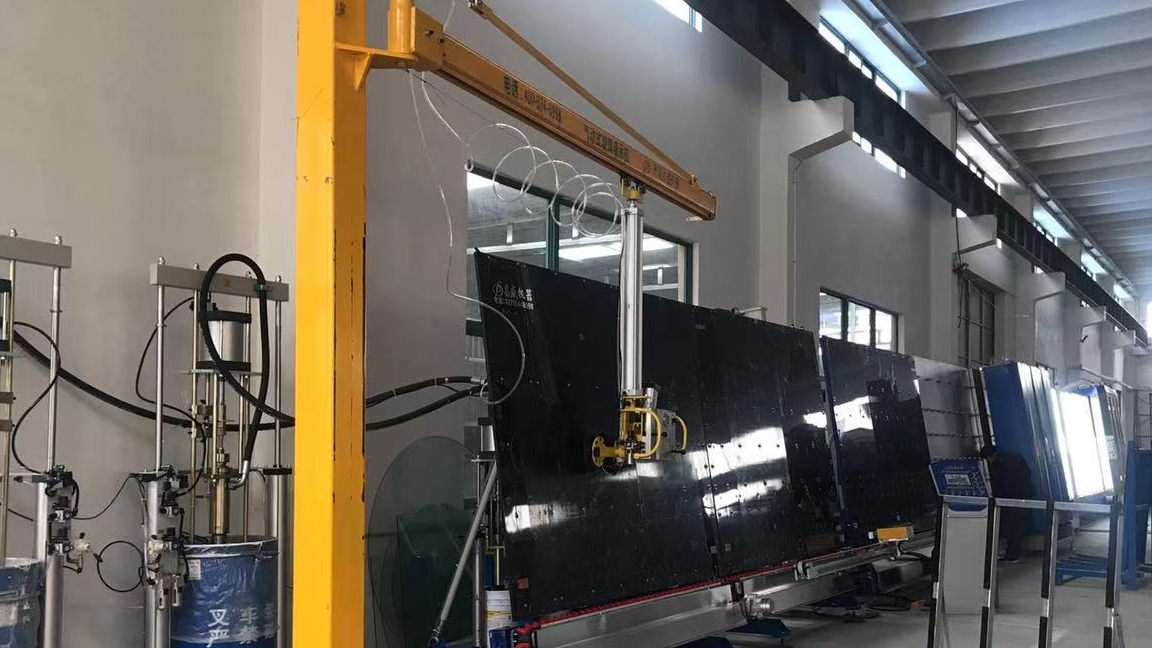
在中空玻璃生产线中,扫描仪是保障玻璃尺寸精准识别的核心设备,后续合片、封胶、裁切等工序的精度都依赖它的检测数据。如果扫描仪识别不准,很容易出现玻璃尺寸匹配偏差,导致合片错位、封胶不规整等问题,直接影响产品合格率。因此,定期规范调整扫描仪至关重要。今天就结合一线实操经验,给大家科普中空玻璃生产线扫描仪的具体调整方法,帮大家轻松搞定识别精准度问题。
In the production line of insulating glass, the scanner is the core equipment to ensure accurate identification of glass dimensions, and the accuracy of subsequent processes such as lamination, sealing, and cutting depends on its detection data. If the scanner does not recognize accurately, it is easy to cause glass size matching deviation, leading to problems such as misalignment and irregular sealing, which directly affects the product qualification rate. Therefore, it is crucial to regularly regulate and adjust the scanner. Today, based on practical experience on the front line, we will explain to you the specific adjustment methods for the scanner of the insulated glass production line, helping you easily solve the problem of recognition accuracy.
先跟大家理清核心逻辑:扫描仪调整的核心目标是让设备能精准捕捉玻璃尺寸、识别基准边界,操作全程围绕“清洁保障感应精准-参数适配生产需求-标准校准建立基准-测试微调优化效果”展开。整个过程不用复杂工具,只要按步骤操作,新手也能快速上手,重点在于细节把控,避免因清洁不到位或参数偏差影响识别效果。
First, let me clarify the core logic: the core goal of scanner adjustment is to enable the device to accurately capture glass dimensions and identify benchmark boundaries. The entire operation revolves around "cleaning assurance, precise sensing, parameter adaptation to production needs, standard calibration, benchmark establishment, testing, fine-tuning, and optimization effects". The entire process does not require complex tools, as long as the steps are followed, beginners can quickly get started. The focus is on controlling the details to avoid affecting the recognition effect due to inadequate cleaning or parameter deviations.
第一步,清洁镜头,排除灰尘干扰。生产车间粉尘较多,扫描仪镜头积灰会直接影响扫描精度。首先打开扫描仪的保护盖子,仔细检查镜头表面是否有灰尘、胶渍等杂质;如果有,用干净的无尘布轻轻擦拭干净,注意不要用硬纸或粗糙布料,避免划伤镜头。这一步是基础,看似简单却能有效减少后续识别误差,建议每次调整前都先做清洁。
The first step is to clean the lens and eliminate dust interference. There is a lot of dust in the production workshop, and the accumulation of dust on the scanner lens will directly affect the scanning accuracy. Firstly, open the protective cover of the scanner and carefully inspect the lens surface for dust, glue stains, and other impurities; If there is, gently wipe it clean with a clean dust-free cloth, being careful not to use hard paper or rough fabric to avoid scratching the lens. This step is the foundation, which may seem simple but can effectively reduce subsequent recognition errors. It is recommended to clean before each adjustment.
第二步,调整核心参数,适配生产需求。清洁完成后,操作设备的主控屏幕,找到“扫描仪设置”选项并进入。里面主要需要调整两个关键参数:扫描精度和识别灵敏度。扫描精度根据生产的玻璃尺寸要求调整,尺寸误差要求严格时就调至高精度模式;识别灵敏度则要适配玻璃表面状态,比如磨砂玻璃或有轻微划痕的玻璃,可适当调高灵敏度,避免漏识别。调整时小幅度微调,记好调整前后的参数,方便后续回溯。
The second step is to adjust the core parameters to meet production needs. After cleaning is complete, operate the main control screen of the device, find the "Scanner Settings" option and enter. There are two key parameters that need to be adjusted inside: scanning accuracy and recognition sensitivity. The scanning accuracy is adjusted according to the size requirements of the produced glass, and when the size error requirements are strict, it is adjusted to high-precision mode; The recognition sensitivity should be adapted to the surface state of the glass, such as frosted glass or glass with slight scratches. The sensitivity can be adjusted appropriately to avoid missing recognition. Make small adjustments during adjustment, remember the parameters before and after adjustment, and facilitate subsequent backtracking.
第三步,标准玻璃校准,建立识别基准。参数调整完成后,必须进行校准才能保证精度。取一块已知准确尺寸的标准玻璃,平稳放在扫描仪的检测区域内,确保玻璃边缘对齐检测基准线。然后在屏幕上选择“校准”功能,让扫描仪自动识别标准玻璃的尺寸和边界,完成基准建立。校准结束后,一定要点击“保存参数”,避免后续参数丢失,这是保障长期识别精准的关键一步。
The third step is to calibrate the standard glass and establish an identification benchmark. After the parameter adjustment is completed, calibration must be performed to ensure accuracy. Take a standard glass of known accurate size and place it steadily in the detection area of the scanner, ensuring that the edge of the glass aligns with the detection reference line. Then select the 'Calibration' function on the screen to have the scanner automatically recognize the size and boundaries of the standard glass, completing the benchmark establishment. After calibration is complete, be sure to click "Save Parameters" to avoid loss of subsequent parameters, which is a key step in ensuring long-term recognition accuracy.
第四步,测试微调,确认效果。校准保存后,进行实际扫描测试。随机选取几块不同尺寸的生产用玻璃,依次通过扫描仪,观察屏幕上显示的尺寸数据是否与实际尺寸一致。如果出现识别不准确的情况,重复前面的步骤微调:先检查镜头是否干净,再小幅调整参数,必要时重新用标准玻璃校准,直到扫描数据精准无误为止。
Step four, test the fine-tuning and confirm the effect. After calibration and saving, perform actual scanning testing. Randomly select several pieces of production glass of different sizes, and use a scanner to observe whether the size data displayed on the screen is consistent with the actual size. If there is inaccurate recognition, repeat the previous steps for fine-tuning: first check if the lens is clean, then adjust the parameters slightly, and if necessary, recalibrate with standard glass until the scanned data is accurate and correct.
这里补充几个实操注意点:一是调整和校准前,要确保扫描仪的检测区域无杂物,输送轨道平整,避免玻璃放置歪斜影响检测;二是标准玻璃要妥善保管,避免碰撞、磨损,定期校验其尺寸精度,防止因标准件偏差导致校准失效;三是调整参数时,不要一次性大幅改动,建议每次调整一个参数并测试,明确参数变化对识别效果的影响;四是日常生产中,建议每天开机前做一次简单清洁和试扫描,及时发现问题。
Here are a few practical points to note: Firstly, before adjustment and calibration, it is necessary to ensure that the detection area of the scanner is free of debris, the conveying track is flat, and avoid the glass being placed askew and affecting the detection; Secondly, standard glass should be properly stored to avoid collisions and wear, and its dimensional accuracy should be regularly verified to prevent calibration failure due to deviations in standard components; Thirdly, when adjusting parameters, do not make significant changes at once. It is recommended to adjust one parameter at a time and test it to clarify the impact of parameter changes on recognition performance; Fourthly, in daily production, it is recommended to perform a simple cleaning and trial scan before starting up each day to promptly identify any issues.
扫描仪作为中空玻璃生产线的“眼睛”,其识别精度直接决定后续工序的顺畅度和产品质量。掌握“清洁-调参-校准-测试”的调整流程,能让一线操作人员快速解决扫描不准的问题,减少因尺寸偏差导致的返工和生产延误。希望这次科普能帮到大家,要是调整后仍有识别异常,可进一步检查扫描仪的光源是否正常、传感器是否损坏,或联系设备厂家技术支持。
As the "eyes" of the insulated glass production line, the recognition accuracy of the scanner directly determines the smoothness of subsequent processes and product quality. Mastering the adjustment process of "cleaning parameter adjustment calibration testing" can enable frontline operators to quickly solve scanning inaccuracies and reduce rework and production delays caused by dimensional deviations. I hope this science popularization can help everyone. If there are still recognition abnormalities after adjustment, you can further check whether the light source of the scanner is normal, whether the sensor is damaged, or contact the technical support of the equipment manufacturer.
本文由 中空玻璃生产线 友情奉献.更多有关的知识请点击 http://www.jncsjx.com/ 真诚的态度.为您提供为全面的服务.更多有关的知识我们将会陆续向大家奉献.敬请期待.
This article is a friendly contribution from the insulating glass production line For more related knowledge, please click http://www.jncsjx.com/ Sincere attitude To provide you with comprehensive services We will gradually contribute more relevant knowledge to everyone Coming soon.
- 丁基胶涂布机选不对=白耗胶+常返工,昌盛机型实测,47m/min高效省本 2026/04/24
- 中空玻璃封胶不合格=返工亏大钱,中空玻璃加工设备核心解析,精准避坑 2026/04/22
- 全自动中空玻璃生产线仅需3-4人,省人高效,玻璃企业降本必看 2026/04/20
- 避坑!中空玻璃加工设备选不对,60%产能浪费+品质不达标,看完少走弯路 2026/04/13
- 中空玻璃加工设备升级,4大核心革新,解决清洗刮伤、干燥不彻底8大痛点 2026/04/08
- 中空玻璃生产线避坑!传送带3大核心优势,零划痕+高平稳,产能提升35%不返工 2026/04/07
- 中空玻璃生产线:清洗段全面升级,娇贵玻璃清洗接近零损伤 2026/04/06
- 中空玻璃加工设备革新:一体钣金框架告别焊接,稳到零偏差,次品率直降 2026/03/27
- 丁基胶涂布机:中空玻璃氩气锁鲜关键!实测底部99.9%,边缘95.6%全达标 2026/03/26
- 山东玻璃厂必看!大小片中空玻璃全自动封胶线,告别残胶返工,打胶零瑕疵 2026/03/26
 产品分类Product categories
 联系我们Contact us